
Virtual Journeys With Collective Goals
The default setting when adding a virtual journey to your challenge is for the journey to travelled based on an individual or team goal. For example, if your entire event has a goal of 300 thousand steps, each participant will see their progress in the journey based on how well they are doing at achieving the goal of 300 thousand steps.
To make your challenge more cooperative, you may want to use a collective goal instead. With a collective goal, progress in the journey depends on everyone's contribution to the collective goal. For example, if your goal for each participant is 300 thousand steps for the entire event, and there are 100 participants in your event, you might set a collective goal of 30 million steps (300000 steps* 100 participants). Here is a best practice for creating a virtual journey with a collective goal.
- Create your challenge and set the goal for the 300 thousand individual steps and 30 million collective steps.
- Add your virtual journey. MoveZenGo will create all of the badges for the journey landmark based on the individual goal.
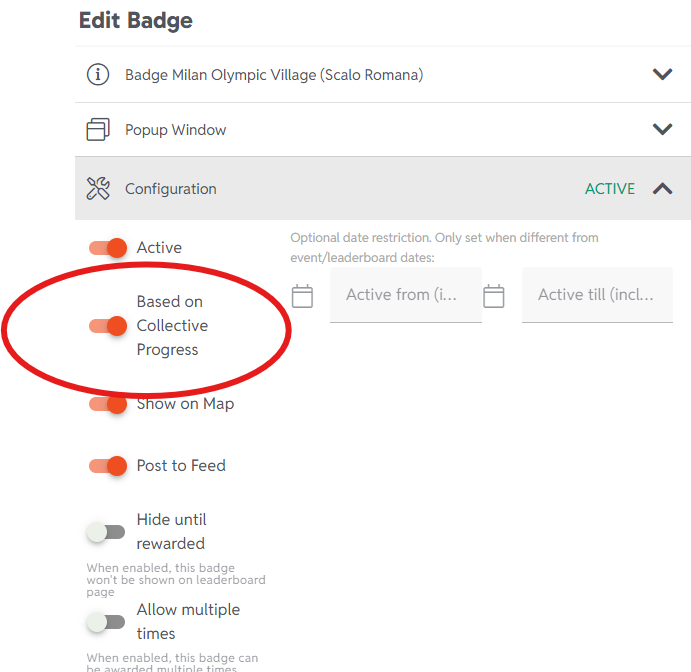
- Open the settings for each badge and make the following changes:
-
In the badge Configuration group, turn on the Based on Collective Progress switch.
-
In the Goal group, multiply the value in Goal Configuration by the number of participants.
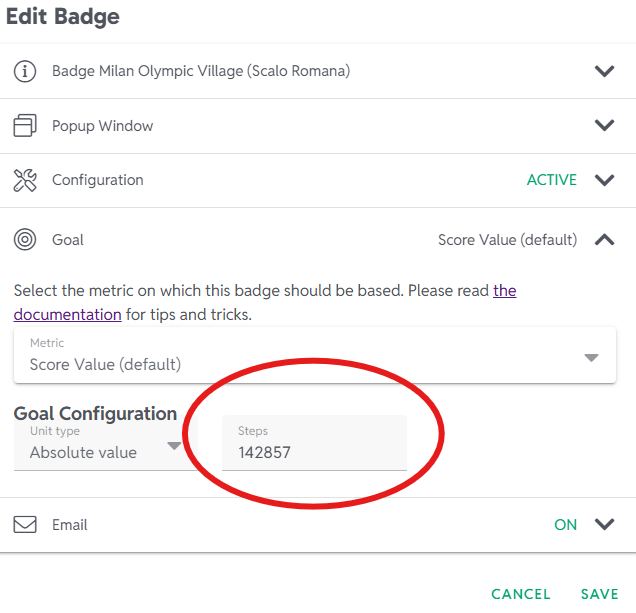
- Select SAVE.
- Repeat for each journey landmark badge.
-
- Go back and edit the settings of your challenge. Remove the individual goal from the challenge. If you don't do this step, the map will not render all the badges in your journey correctly.
Note that Collective Badges are not automatically awarded by MoveZenGo. Instead, when a Collective Badge is earned by your participants, the administrator will receive an email with instructions about how to award it. If you did not receive or no longer have that email, you can go to the badge section of your challenge and select the trophy icon next to the badge. This will award the badge.
